Basic ligation mode
Use basic mode when you only need the insert DNA mass. This mode fits homework problems, quick planning, and notebook checks before you open a tube.
Calculate the insert DNA mass needed for a ligation reaction from vector length, insert length, vector mass, and insert:vector molar ratio. Use basic mode for quick classroom problems. Use advanced mode when you need pipetting volumes for cloning at the bench.
The calculator updates every result as you type. It reports insert mass, fmol amounts, insert volume, vector volume, reaction water, and a ratio comparison table.
Basic mode calculates insert mass. Advanced mode builds a pipetting plan.
Enter the vector backbone length and the vector DNA mass you want in one ligation.
Enter the insert fragment length and the target insert:vector molar ratio.
This gives a 3.0:1 insert:vector molar ratio with 100.0 ng vector DNA.
Vector molecules
50.51 fmol
Insert molecules
151.52 fmol
The insert mass changes with both fragment size and molar excess.
Run two or three ratios when background or ligation efficiency is uncertain.
| Insert:vector | Insert mass | Insert volume |
|---|---|---|
| 1:1 | 16.67 ng | Add concentration |
| 2:1 | 33.33 ng | Add concentration |
| 3:1 | 50 ng | Add concentration |
| 5:1 | 83.33 ng | Add concentration |
| 7:1 | 116.67 ng | Add concentration |
| 10:1 | 166.67 ng | Add concentration |
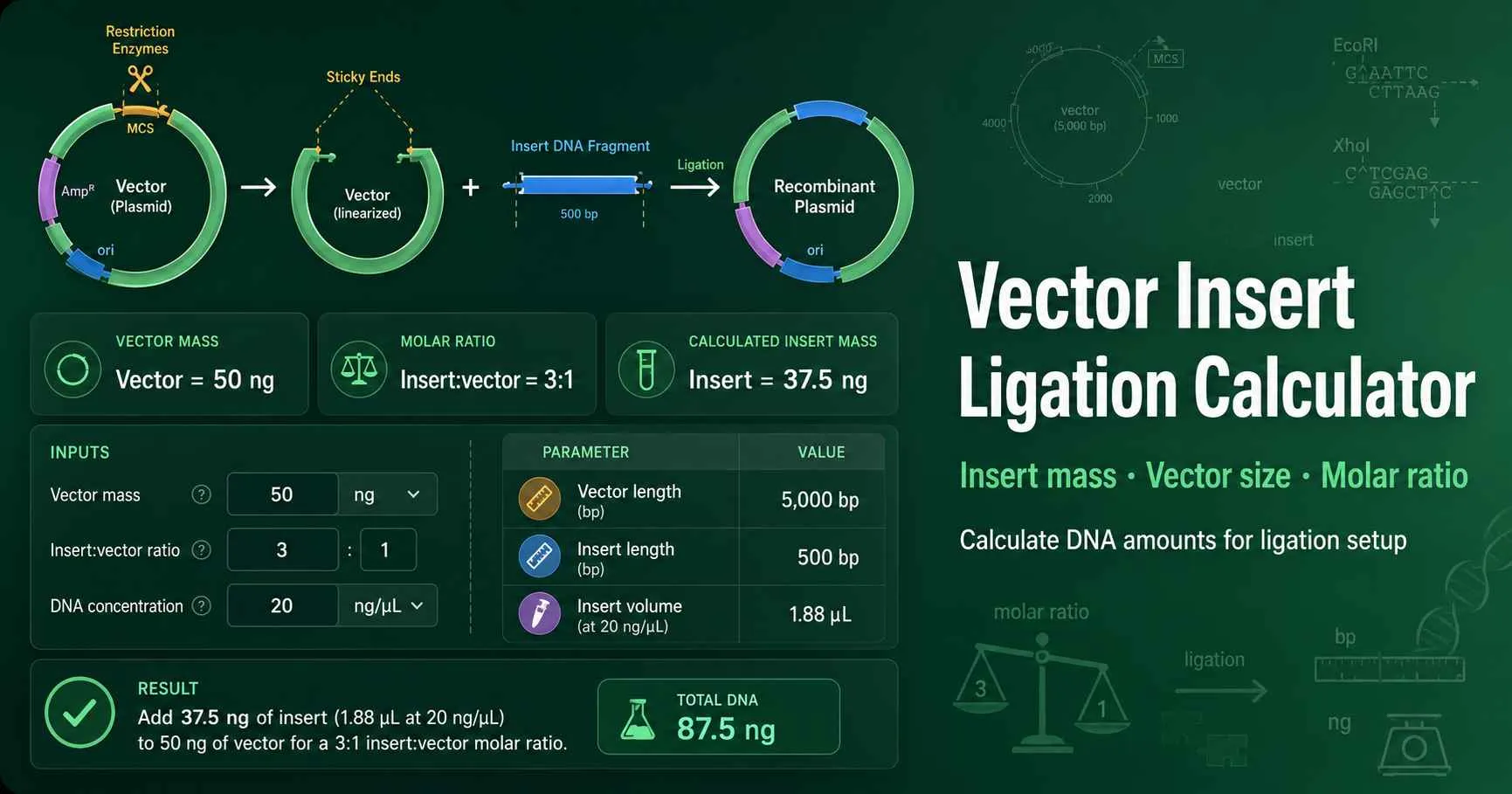
This tool answers one practical cloning question first: how much insert DNA should I add to my vector? It uses vector mass, fragment lengths, and the desired insert:vector molar ratio to convert nanograms into molecule numbers. The result helps you set up sticky-end ligations, blunt-end ligations, and adapter ligations with the right insert excess.
Ligation ratios compare molecules, not visual band brightness. A 500 bp insert and a 5,000 bp vector do not carry the same number of molecules per nanogram. The calculator corrects for that length difference before it reports the insert mass.
NEB describes its ligation calculator as a tool that calculates insert mass at typical molar insert:vector ratios. Promega also lists vector:insert molar ratio under its BioMath DNA calculators, which matches the calculation used here. Check NEBioCalculator and Promega BioMath.
Enter the vector backbone length in base pairs and the vector mass in nanograms.
Enter the insert length and choose the target insert:vector molar ratio.
Switch to advanced mode when you know vector and insert concentrations in ng/µL.
Read the required insert mass, reaction volumes, fmol amounts, and ratio table before setting up the ligation.
Start with a 3:1 insert:vector ratio when you clone one purified insert into a linearized plasmid. Compare 1:1, 2:1, 3:1, and 5:1 when the colony number matters. Use a vector-only control to measure background from uncut, self-ligated, or incompletely dephosphorylated vector.
Each input maps to a real cloning decision. The table below explains what each component controls and how it changes the result.
| Tool component | What it means | Why it matters |
|---|---|---|
| Vector length | Backbone size in base pairs after digestion. | Longer vectors contain fewer molecules per nanogram. |
| Insert length | Fragment size in base pairs. | Short inserts need less mass to reach the same molecule count. |
| Vector mass | Nanograms of vector in one tube. | More vector requires proportionally more insert DNA. |
| Insert:vector ratio | Insert molecules per vector molecule. | Higher ratios increase insert availability but may raise side products. |
| DNA concentrations | Stock DNA concentration in ng/µL. | Advanced mode converts mass into pipetting volumes. |
The standard insert mass formula uses fragment length as a proxy for molecular weight. It assumes double-stranded DNA at about 660 g/mol per base pair.
insert ng = vector ng × insert bp ÷ vector bp × insert:vector molar ratio
A second calculation converts mass into femtomoles. The calculator uses fmol to show molecule number and ng to show what you pipette. For deeper DNA mass conversions, use the DNA molecular weight calculator. For concentration conversion, use the ng/µL to nM calculator.
Use basic mode when you only need the insert DNA mass. This mode fits homework problems, quick planning, and notebook checks before you open a tube.
Use advanced mode when you know DNA concentrations. It reports vector volume, insert volume, buffer volume, ligase volume, water volume, and scaled master setup.
A common cloning setup uses 100 ng of a 3,000 bp vector and a 500 bp insert. The target ratio equals 3 insert molecules per vector molecule. The calculation gives 50 ng insert DNA.
100 ng × 500 bp ÷ 3,000 bp × 3 = 50 ng insert
If the insert stock measures 10 ng/µL, add 5 µL insert DNA. If the vector stock measures 25 ng/µL, add 4 µL vector DNA. In a 20 µL ligation with 2 µL of 10X buffer and 1 µL ligase, water fills the remaining 8 µL.
A short 80 bp insert behaves differently from a large gene insert. Suppose you ligate 50 ng of a 3,200 bp vector with an 80 bp insert at a 10:1 ratio. The insert mass equals only 12.5 ng because short DNA fragments pack many molecules into a small mass.
50 ng × 80 bp ÷ 3,200 bp × 10 = 12.5 ng insert
High insert excess can help adapters find vector ends. It can also increase adapter dimers or concatemers. Check end compatibility with the sticky end compatibility calculator before you assume two restriction fragments can ligate productively.
| Insert:vector ratio | Best use | Practical note |
|---|---|---|
| 1:1 | Clean cohesive-end insert with low background. | Useful when excess insert causes concatemers. |
| 3:1 | Most single-insert plasmid ligations. | Good first condition for many student and research workflows. |
| 5:1 | Low insert recovery or blunt-end ligation. | Watch for insert multimers. |
| 10:1 | Very short inserts or adapters. | Run controls because background can rise. |
A correct molar ratio cannot rescue every ligation. If colonies fail, first check DNA end compatibility, restriction digestion, vector dephosphorylation, insert purification, and competent-cell efficiency. A vector-only plate tells you whether background comes from self-ligated vector.
Very dilute DNA stocks often create impossible reaction volumes. Concentrate the insert, lower vector mass, or raise total reaction volume. Keep buffer at 1X in the final tube because ligase activity depends on the correct buffer environment.
Use vector mass, vector length, insert length, and the target insert:vector molar ratio. The common formula is insert ng = vector ng × insert bp ÷ vector bp × insert:vector ratio. This calculator applies that formula live and also converts the result into fmol and pipetting volume when you enter DNA concentrations.
Start with 3:1 insert:vector for many single-insert ligations. A 1:1 or 2:1 ratio can work when the insert is large or when background remains low. Short adapters often need higher insert excess, such as 10:1, because each insert molecule carries very little mass. Run more than one ratio when you have enough DNA and transformation plates.
Ligation depends on molecule count, not just nanograms. A 500 bp insert has many more molecules per nanogram than a 2,000 bp insert. The calculator corrects for that by multiplying vector mass by insert length divided by vector length. This keeps the molar ratio meaningful across different fragment sizes.
Yes. The mass calculation still works because it only uses molecule number. Blunt-end ligation often needs cleaner DNA, higher DNA concentration, longer ligation time, or more ligase than sticky-end ligation. Use the advanced mode to check whether your reaction volume can support the DNA amounts you plan to add.
A negative water volume means the DNA, buffer, ligase, and additives already exceed the selected reaction volume. Increase the total ligation volume, lower vector mass, or concentrate the DNA stocks. The warning usually appears when insert DNA is dilute or when a short insert needs a high molar excess.
Use ng for pipetting because your DNA concentration usually comes from a fluorometer or spectrophotometer in ng/µL. Use fmol to understand molecule number. Ligation ratios compare insert molecules with vector molecules, so fmol explains why a small insert may need only a few nanograms.
No calculator can guarantee cloning success. Insert:vector ratio only solves one part of the workflow. Dephosphorylation, end compatibility, enzyme heat inactivation, gel purification, ligase activity, competent-cell efficiency, and insert toxicity can all change colony number. Use a vector-only control and at least one positive control when the experiment matters.